


Playing video games on Steam might seem to always require an active internet connection, but that’s not entirely true. With proper setup, you can enjoy your favorite titles offline, without being connected to the internet. This can be especially useful when traveling, experiencing internet outages, or simply wanting to avoid constant online requirements. However, setting up Steam for offline play involves a few important steps to ensure a smooth gaming experience. Understanding how to prepare Steam and enable offline mode can save you from frustration and allow seamless gaming sessions anywhere.
Most gamers are unaware that playing their Steam library offline is entirely possible. This feature isn’t always highlighted or discussed extensively, which is why many users miss out on the benefits of offline gameplay. Whether you’re a casual gamer or a dedicated enthusiast, knowing how to configure your Steam account for offline access can enhance your gaming flexibility and convenience.
What is the Offline Mode in Steam?
Steam’s offline mode is a feature that allows you to play your games without an internet connection. Normally, many games on Steam require regular online verification, updates, or DRM checks. When you enable offline mode, Steam temporarily suspends these online requirements, letting you enjoy your games locally.
To successfully use Steam offline mode, you must first establish an internet connection to log in and verify your games. Once this initial setup is complete, you can disconnect from the internet and continue gaming without interruptions. It’s important to note that some titles may still need an internet connection if they rely on multiplayer features or require online activation. For more insights into game development processes, you can explore concepts related to rethinking the value of large-scale game development.
How to Play Games Without Internet Using Steam Offline Mode
Preparing your Steam account for offline play involves a few essential steps. These ensure that your library is ready to be accessed offline and that Steam functions properly without an internet connection. Follow this detailed guide to set up everything correctly.
Preparing Steam for Offline Play
Since Steam requires an active internet connection during the initial setup, you’ll need to perform some preparations beforehand:
- Connect your computer to the internet and launch the Steam application.
- In the Steam client, click on Steam in the top menu, then choose Settings.
- Navigate to the Account section within the Settings menu.
- Locate the option labeled Don’t save account credentials on this computer and ensure it is unchecked. If this box remains checked, offline mode will not work because your login credentials are not saved locally.
- Confirm your changes by clicking OK.
- Next, go to the Downloads section in the main Steam window.
- Check if there are any pending downloads or updates. If there are, cancel or complete them to ensure your game library is fully updated and ready for offline access.
Once your account and library are prepared, you can proceed to enable offline mode.
Enabling Offline Mode on Steam
After completing the setup, activating offline mode is straightforward:
- Return to the main Steam window.
- Click on Steam in the top menu bar.
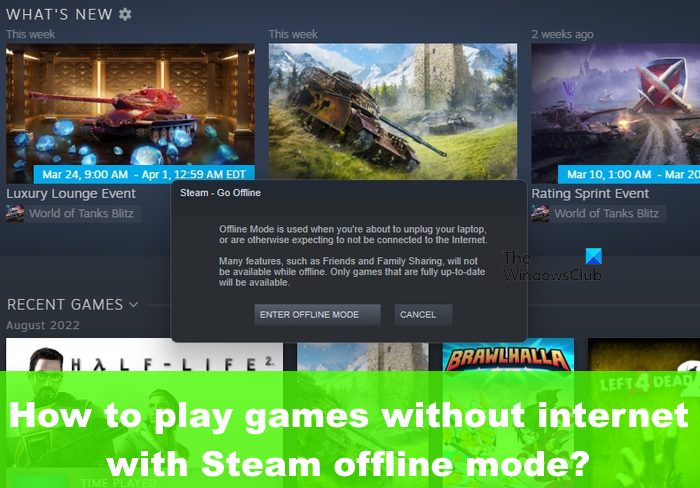
- Select Go Offline from the dropdown options.
- A confirmation message will appear explaining what offline mode entails.
- Click Enter Offline Mode to activate it.
Steam will now restart in offline mode, allowing you to launch and play your games without an internet connection. Keep in mind that games requiring online verification or multiplayer features may still be inaccessible offline.
Can You Play Offline Without an Internet Connection?
Most Steam games can be played offline once they are fully downloaded and verified. The offline mode feature works well for single-player games or titles that don’t depend on an internet connection for gameplay. However, some games or applications might need a constant online connection due to their DRM systems or multiplayer components.
To optimize your offline gaming experience, it’s advisable to verify your game files and update your library before disconnecting. Additionally, for a broader understanding of how game development impacts online features, consider reading about mastering game dev story essential strategies for success and award wins.
How to Appear Offline on Steam
If you want to hide your online status or appear offline to friends, Steam offers simple options to do so:
- Open the Friends list panel within Steam.
- Click on the Friends tab at the top.
- In the dropdown menu, select Invisible to appear offline but still be visible to friends.
- Alternatively, choose Offline to completely disconnect from the friends list, making your status appear as if you are not online at all.
This feature is useful for maintaining privacy or avoiding distractions while gaming offline. For more tips on managing your Steam profile and online presence, explore strategies such as how to get direction points in game dev story.
—
By following these procedures, you can maximize your gaming flexibility on Steam, enjoying titles offline whenever needed. Proper setup ensures that your gaming sessions are smooth, uninterrupted, and enjoyable regardless of your internet situation.