How to Play Classic Pokémon Games on Your Smartphone
Revisiting the beloved Pokémon titles from past consoles has never been easier, thanks to the power of emulators. These software programs allow you to experience classic games like Pokémon Red, Blue, or Diamond on your modern mobile device, whether it’s an Android or an iPhone. With a little setup, you can relive the nostalgia of catching Pikachu in Viridian Forest or battling your way to become a Pokémon Champion, all from the comfort of your pocket.
Emulators act as virtual recreations of older gaming hardware, enabling you to run games originally designed for devices like the Game Boy, Game Boy Advance, or Nintendo DS. They have become popular among gamers eager to access their favorite retro titles without needing the original hardware. This process involves two key components: the emulator itself and the game files, known as ROMs. While using emulators is generally legal, acquiring ROMs can enter gray legal areas, especially if you do not own the original copies. Always ensure you are complying with local laws and copyright regulations.
In this guide, you’ll learn how to set up emulators on your smartphone, obtain the necessary ROMs, and keep your gaming experience fresh with modifications and hacks. Whether you’re an Android enthusiast or an iPhone user, this comprehensive overview will help you get started on your journey to relive classic Pokémon adventures anytime, anywhere.
Emulators Enable You to Relive Retro Gaming on Modern Devices
An emulator is a software program designed to imitate the operation of a specific gaming console or hardware system. They are particularly popular among gamers because they allow older games to run on newer devices, such as smartphones and PCs. For example, the Nintendo Switch Online service uses emulation technology to enable players to access classic titles from the NES, N64, and other legacy consoles directly on the Switch.
When it comes to mobile gaming, emulators serve as a bridge to the past, making titles like Pokémon, The Legend of Zelda, and Super Mario Bros accessible on your phone. Despite occasional legal challenges faced by some emulator projects—like Yuzu—using emulators is generally considered legal, especially when you are using software that is open-source or developed without copyright infringement. The legality typically hinges on how the emulator is marketed and whether it uses proprietary code from the original hardware.
Modern emulator features have significantly improved the user experience. Many allow for save states, game speed adjustments, installation of mods, and display customization, making gameplay more flexible and enjoyable. Best of all, many emulators are available for free and can be downloaded directly onto your device, providing an affordable way to access a vast library of retro games.
However, running emulators on smartphones often requires touchscreen controls, which can be less comfortable than physical buttons. For turn-based games like Pokémon, this isn’t usually a problem, but for more action-oriented titles, a dedicated controller, such as the Backbone One, can enhance playability. These controllers connect via USB-C or Bluetooth and provide a tactile gaming experience similar to original hardware.
The Best Emulators for Android
For Android users, several reliable emulators are available. A popular choice is One Emulator, which supports Game Boy, Game Boy Advance, and Nintendo DS games, allowing you to enjoy a broad range of Pokémon titles from the classic Red & Blue to Black & White 2. This app is free and straightforward to set up, making it suitable for newcomers.
For users seeking more advanced features and a more versatile experience, RetroArch offers extensive platform support, including Atari, PlayStation, and others, in addition to Nintendo systems. Keep in mind that RetroArch may require manual installation if it’s not available through the Google Play Store on your device.
The Best Emulators for iPhone
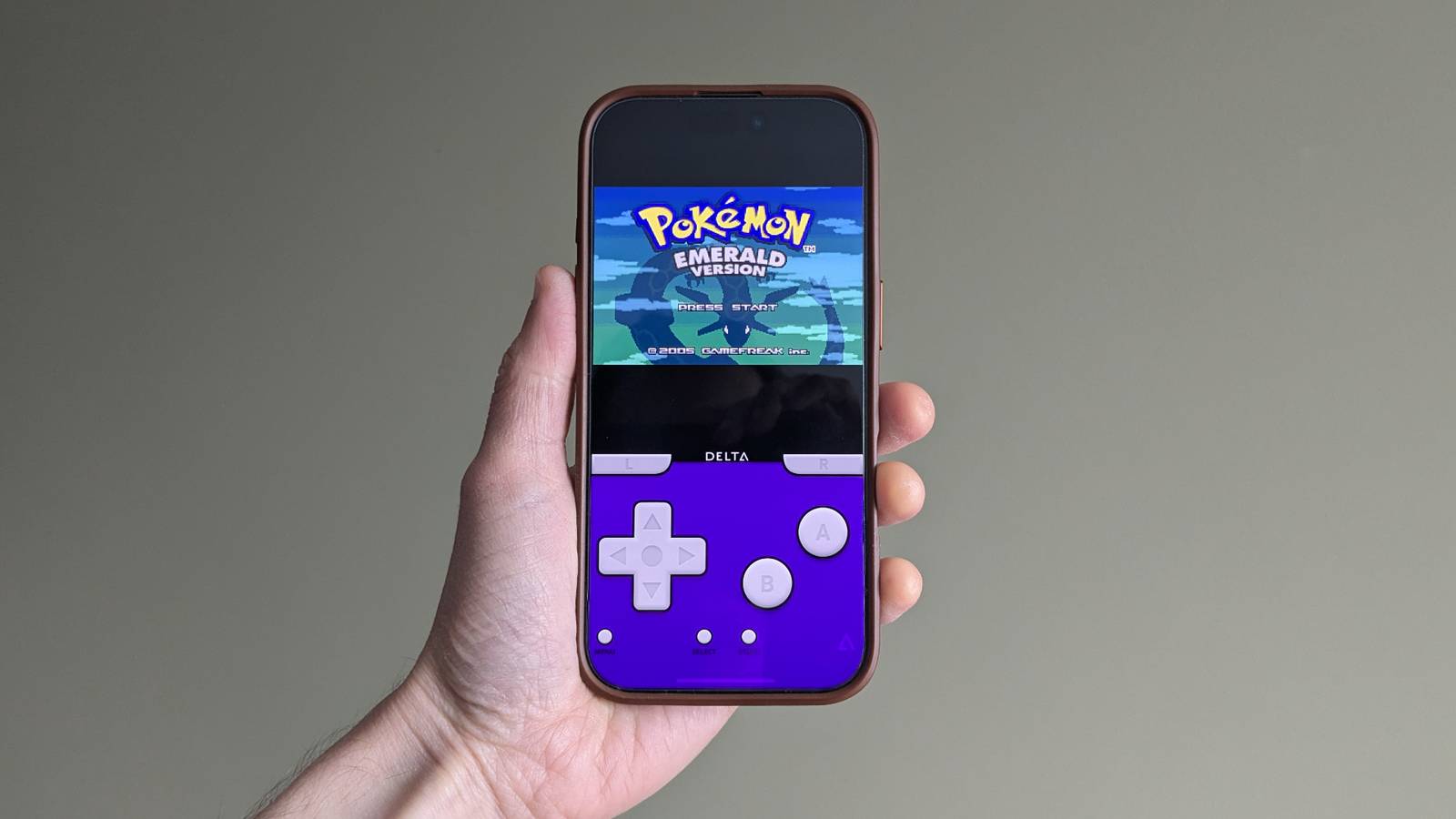
Apple has loosened its restrictions on emulators in recent years, and now several options are available via the App Store. For a streamlined experience focused on Nintendo titles, Delta is highly recommended. It consolidates emulators for NES, SNES, N64, Game Boy, and Nintendo DS into a single, user-friendly interface, allowing you to revisit Pokémon games from Red to Black & White 2 with ease.
For those wanting a broader range of platforms, including Atari and PlayStation, RetroArch remains a top choice, offering extensive customization and platform support. Its versatility makes it suitable for gamers interested in exploring various retro titles beyond Pokémon.
Obtaining and Loading ROMs
Emulators require ROM files, which contain the game data extracted from the original cartridges or discs. These files are essential to run your preferred Pokémon titles on your emulator. To load ROMs, create a dedicated folder on your device and transfer the game files there. For iPhone users, this can be done via file-sharing services or dedicated file management apps.
Once your ROMs are stored, open your emulator’s settings and select the folder containing your game files. This process often involves navigating to an “Add ROMs” or “Select Folder” option. After setting this up, your emulator should display all available games, ready for you to start your Pokémon adventure.
It’s important to note that the legality of ROMs varies. Downloading ROMs for games you do not own is illegal in many jurisdictions. However, backing up games you possess physically might be considered fair use in some areas. Always research your local laws to ensure compliance.
How to Load Your ROMs
After acquiring your ROM files, organize them into a folder on your device. On Android or iPhone, access your file manager and create a specific directory, such as “ROMs.” Place all your Pokémon game files in this folder. Then, within your emulator’s settings, locate the option to select or scan for ROMs, and choose your designated folder. Your emulator should then recognize your games, allowing you to launch them effortlessly and start training your Pokémon team.
Keep Your Pokémon Experience Fresh with Hacks and Mods
If you’ve played through the original Pokémon titles multiple times, the thrill of revisiting them might diminish. To keep the experience exciting, consider exploring ROM hacks—modified versions of the original games that introduce new stories, villains, and gameplay features. These hacks can range from simple quality-of-life improvements to entirely new Pokémon regions.
Downloading hacked ROMs offers a fresh perspective on familiar games, providing new challenges and adventures. This is a great way to stay engaged and test your skills against inventive modifications created by the dedicated Pokémon fan community. Just remember to source hacks from reputable sites and enjoy the game within legal boundaries.
By leveraging emulators and ROM hacks, you can enjoy a vast library of classic Pokémon titles anytime, anywhere, ensuring your journey to be the very best continues without interruption.