


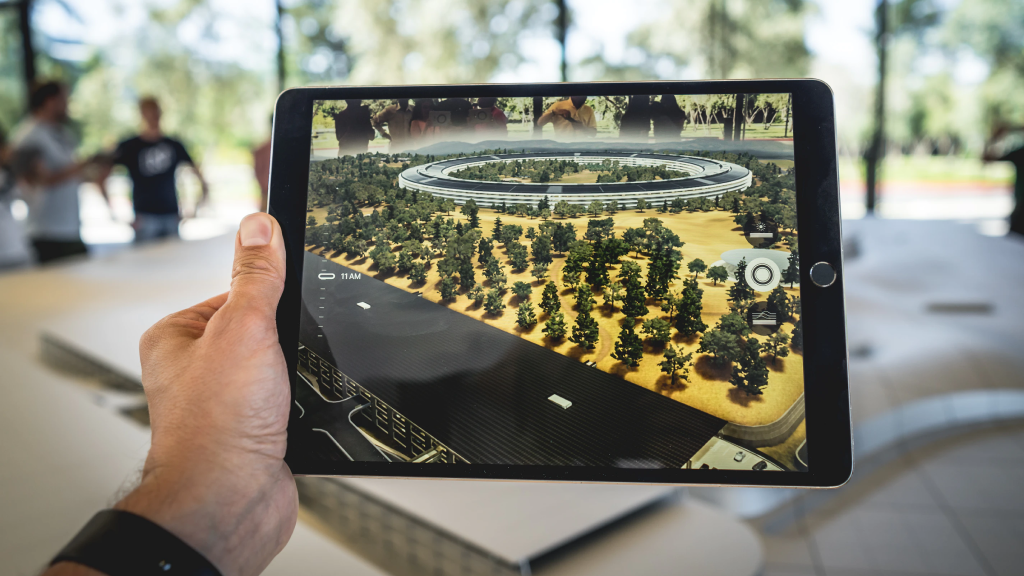
Augmented reality (AR) and virtual reality (VR) technologies are rapidly evolving, offering unprecedented ways to interact with digital content overlaid onto the physical environment. While mainstream excitement often centers around games like Pokémon Go, a multitude of innovative AR apps are expanding our capabilities—from education and home design to art and communication. These applications are accessible through smartphones, making cutting-edge AR experiences available to nearly everyone without the need for expensive hardware. As technology advances, our daily interactions with digital content will become more immersive and integrated, hinting at a future where augmented visuals blend seamlessly into our reality.
1. InkHunter
( iPhone ) ( Android )
Have you ever considered how a tattoo might look on your body before committing to the permanent ink? InkHunter makes this possible by allowing you to virtually preview tattoos on your skin. Simply place the three-line “smiley face” marker on your arm in the desired spot and size, then view how the design would look in real time. This AR application helps users visualize their tattoo ideas with remarkable accuracy, reducing uncertainty and ensuring confidence before making a permanent decision.
2. Quiver
( Android )
Transform your coloring pages into dynamic 3D scenes with Quiver. Coloring is a calming activity, but with this app, you can bring your artwork to life through augmented reality. After downloading special coloring sheets, you can see your colored creations pop into three-dimensional space, moving and interacting as if alive. From hatching lines to characters, this app adds a new layer of fun and creativity to traditional coloring, making it a perfect tool for artists of all ages to explore their imagination.
3. Magic Plan
( iPhone ) ( Android )
Creating accurate floor plans has traditionally involved measuring tapes and sketching on paper, often leading to inaccuracies. Magic Plan simplifies this process by using your smartphone’s camera to generate detailed layouts of your space with just a few taps. Point your device at the corners of a room, and the app will automatically produce scaled floor plans suitable for real estate listings, renovation projects, or furniture arrangement. This approach offers a quick, precise alternative to manual measurement, saving time and effort.
4. Wayfair
( iPhone ) ( Android )
The Wayfair app brings furniture shopping into your own environment through augmented reality. It allows you to virtually position different pieces in your home to see how they fit and complement your existing decor. The app can also identify furniture styles similar to what you see in your surroundings, helping you find matching or coordinating items. For example, you might take a picture of a table you like to find similar options, or preview a sofa in your living room before purchasing. This immersive shopping experience helps make better furniture decisions with confidence. Moreover, you can explore how different pieces will look in your space before making a purchase.
5. JigSpace
( iPhone )
JigSpace offers an interactive way to learn about complex objects and concepts through step-by-step 3D animations. Curious about how the Gutenberg press worked or what a Mars Base Camp looks like? JigSpace guides you through detailed visualizations of various scientific and technological marvels, making learning engaging and accessible. It covers topics like the solar system, mechanical devices, and engineering principles, providing an educational experience that’s both fun and informative. This app exemplifies how AR can enhance understanding by offering immersive visual explanations.
6. GeoGebra AR
( iPhone )
Mathematics can be abstract, but AR brings it into a tangible realm. GeoGebra AR enables users to visualize algebraic equations and geometric shapes in three dimensions, helping to clarify complex concepts. Instead of relying solely on two-dimensional sketches, learners can walk around and examine the 3D representations of functions and curves from multiple angles. This interactive approach not only deepens comprehension but also makes math more engaging. Although it doesn’t do your homework for you, it provides valuable insights into the spatial nature of equations, fostering better understanding and curiosity.
7. Night Sky
( iPhone )
Star gazing becomes more accessible with Night Sky, an app that overlays celestial objects onto your real-world view. Point your device at the night sky, and it will identify stars, planets, satellites, and constellations instantly. The app can show the current position of the International Space Station, making it easier to learn about astronomy and connect with the universe. For those who aren’t familiar with the night sky, this AR tool provides an educational and awe-inspiring experience. Android users can explore similar functionality with apps like SkyView.
8. Vuforia Chalk
( iPhone ) ( Android )
Vuforia Chalk combines video calling with AR annotations, transforming remote communication into an interactive experience. During a conversation, you can draw on your camera feed or your colleague’s screen to highlight specific points or guide them visually. This feature is especially useful for technical support, remote troubleshooting, or collaborative projects. For example, helping a parent set up new technology becomes easier when you can visually demonstrate steps directly on their device’s screen. This tool enhances remote assistance by adding a visual layer to conversations.
9. World Brush
( iPhone )
World Brush allows users to draw in three-dimensional space within their real environment and share their artwork with others. Imagine walking around Boston and discovering vibrant 3D murals created by different artists, or leaving digital graffiti for friends to find. The app’s social feature encourages community engagement and artistic expression, turning the physical world into a canvas. For Android users, similar apps like Paint Space AR offer 3D drawing capabilities, although without integrated social sharing.
10. Ghostbusters World
If you enjoyed capturing creatures in Pokémon Go, Ghostbusters World offers a similar adventure with a supernatural twist. Explore your surroundings to find and trap ghosts using special Proton Packs, which weaken the spirits before capturing them. The game also features cooperative gameplay, allowing you to team up with friends for larger hunts. Its story mode includes turn-based battles where you control ghost characters to fight rival spirits, with an auto mode for more casual play. This AR experience combines gaming, storytelling, and social interaction in a compelling way.
—
These AR applications demonstrate how accessible and versatile augmented reality technology has become. They provide immersive ways to learn, shop, create, and connect—all through your smartphone. As hardware improves, particularly with future AR glasses, our ability to overlay digital content seamlessly onto the real world will become even more astonishing. Instead of viewing ghosts through a phone, we may one day see them right in our living rooms with glasses that expand our field of view. Imagine digital art hanging on your walls that changes with the weather or your mood, or sharing personalized virtual decorations with friends in real time.
Just as the advent of ride-sharing apps revolutionized transportation, AR will unlock possibilities we can’t yet fully envision. Decades ago, few could imagine the convenience of hailing a stranger’s car or having instant access to information at a glance. The coming AR revolution promises similarly transformative changes—blurring the line between digital and physical worlds, and opening up new realms of creativity and interaction.
—
Brian McDonald
Brian McDonald is a Research Associate at the User Experience Center, with a background in design for commercial spaces and experiences. His work includes collaborations with major retailers such as Saks Fifth Avenue and Macy’s, alongside achievements in healthcare hackathons. He holds a Bachelor of Science in Industrial Design from Wentworth Institute of Technology and is pursuing a Master of Science in Human Factors in Information Design at Bentley University.
—
Interested in learning more about innovative digital experiences? Contact us to discover how Bentley’s UX consulting can help your organization.
Other UXC Blogs You Might Like:
- UX, Public Trust, and Bots
- Beware of Persona Bias
- Designing Successful Chatbots
- Back to All UXC Blogs