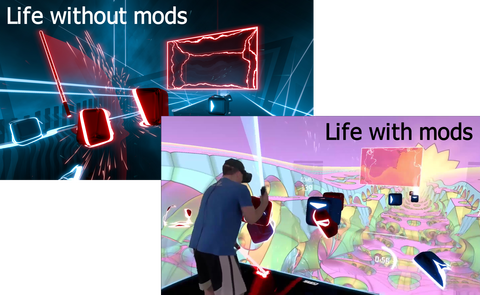
Deep Dive into Modding Unity Games: Injecting Custom Code into Beat Saber
Modding Unity-based games often involves complex technical processes, especially when developers aim to add custom features not originally supported by the game. While most titles do not natively support mods, the vibrant community of modders consistently develops tools and techniques to inject new functionalities into these titles. This article explores how mods are created for Unity games, focusing on the process of injecting code into the game’s architecture, with Beat Saber as a case study. Understanding these methods provides insight into manipulating game engines at a low level, including techniques like library hooking, DLL injection, and runtime modification of managed code.
Many modders start by examining the game’s source code, or more often, the assemblies and libraries it loads. For Unity games, much of the game logic resides within managed .NET assemblies, which are DLL files containing Intermediate Language (IL) code. To modify or extend this code, developers utilize tools such as Mono.Cecil, an open-source library that enables reading and rewriting .NET assemblies. This approach allows the injection of custom code directly into the game’s managed environment, often bypassing the need for official mod support.
About Beat Saber and Its Modding Ecosystem
Beat Saber stands out as one of the most popular VR rhythm games, with a thriving modding community. The game supports custom levels natively, but does not provide a dedicated platform for distributing user-generated content, mainly due to licensing concerns surrounding music. Instead, the community has built a suite of tools and websites, such as beatsaver.com for custom levels, scoresaber.com for leaderboards, and modelsaber.com for 3D assets. The ModAssistant tool simplifies the process of installing and managing mods, making it accessible even for less technical users. All these resources are typically open-source, hosted on platforms like GitHub, highlighting the collaborative nature of the modding scene.
To develop mods for Beat Saber, understanding the underlying engine architecture is crucial. Since the game is built on Unity, it employs C# for scripting, which is compiled into managed assemblies. These assemblies are loaded into the Unity engine at runtime and interact with the core C++ engine via Mono, an open-source implementation of the .NET runtime. Mono facilitates executing C# code in Unity, enabling modders to hook into the game’s managed environment and inject custom features dynamically.
Fundamentals of Unity Architecture and Mono
Unity’s architecture relies on a combination of native C++ code and managed C# scripts. The core engine, written in C++, manages low-level operations, while game-specific logic and UI are scripted in C#. These scripts are compiled into DLLs containing IL code, which Mono executes. Mono acts as a bridge, interpreting IL instructions and managing data exchange between managed scripts and native engine components.
Mono has been under development since 2001 and is maintained by several organizations, including Microsoft. It supports multiple platforms, making it suitable for Unity’s cross-platform nature. When creating mods, developers often utilize Mono.Cecil to modify or extend the managed assemblies, such as UnityEngine.CoreModule.dll, enabling deep customization of game behavior without modifying the native engine.
Creating a Mod Injector: The Role of BSIPA
Modding tools like BSIPA (Beat Saber Illusion Plugin Architecture) are essential for injecting custom code into Unity games that do not support plugins directly. BSIPA is a fork of the IPA plugin injector, adapted specifically for Beat Saber. It consists of several DLL modules, primarily IPA, IPA.Loader, and IPA.Injector, which work together to load, manage, and execute custom mods.
The typical process involves downloading the latest version of BSIPA, placing it into the game’s directory, and running a launcher executable, IPA.exe. This tool copies necessary libraries into the game folder, backing up original files to allow for easy reversion. The core of the system is the injection process, which involves hooking into Unity’s loading routines to insert custom code before the game’s C# scripts are executed.
How the Injection Process Works
The injection begins with modifying Unity’s runtime loading behavior through DLL hooking. BSIPA uses a technique called IAT (Import Address Table) hooking to intercept calls to functions like `GetProcAddress`—a Windows API function used to retrieve addresses of exported functions from DLLs. By replacing this function with a custom hook (`hookGetProcAddress`), the injector can intercept requests for specific functions, such as `mono_jit_init_version`, which initializes the Mono runtime.
This interception allows the injector to perform several critical tasks:
- Load its own Mono environment, enabling custom code execution.
- Modify Unity’s assemblies on the fly, such as removing `sealed` modifiers and making classes and methods accessible.
- Inject a bootstrapper object into the game scene, which manages loading and initializing individual mods.
The bootstrapper, implemented as a Unity MonoBehaviour, executes code that loads mods asynchronously, ensuring they initialize after the game’s core systems are ready. This process effectively injects new features into the game without requiring official support or recompilation.
Modifying Unity’s Core Assemblies
Using Mono.Cecil, the injector modifies the UnityEngine.CoreModule.dll assembly. It unseals classes, making them extendable, and sets methods to be public and virtual, facilitating overrides and extensions. One key modification involves inserting a static constructor into the Application class, which creates a bootstrapper object responsible for loading mods dynamically.
This bootstrapper utilizes Unity’s event system to load plugins after the game’s main scene loads, ensuring mods are initialized at the appropriate time. The entire process occurs during the early stages of game startup, before the main gameplay begins, allowing mods to seamlessly integrate into the game’s runtime environment.
Injecting into Unity’s Lifecycle with Doorstop
A crucial component of the injection process is the use of a library called UnityDoorstop, a variant of the Doorstop project, which enables managed code injection before Unity’s C# scripts execute. It works by hooking into the DLL load process, replacing functions like `GetProcAddress` to insert its own code.
Doorstop is embedded within a system DLL masquerading as a system library, such as `winhttp.dll`. When the game loads, Windows loads this fake DLL first due to the way DLL dependency resolution works, redirecting function calls to the real DLLs after initialization. This approach allows the injector to run code at the earliest possible stage, before Unity’s managed environment is fully initialized.
The Full Injection Sequence
The entire process unfolds as follows:
- The user runs the mod installer (`IPA.exe`), which copies libraries into the game folder.
- The game is launched, triggering Windows to load dependencies, including the fake `winhttp.dll` with Doorstop code.
- Doorstop hooks `GetProcAddress`, intercepting calls to critical Mono functions.
- Unity loads `UnityPlayer.dll`, then invokes `GetProcAddress` to retrieve `mono_jit_init_version`.
- The hook redirects this call to a custom function that initializes Mono and loads the injector assembly (`IPA.Injector.dll`).
- The injector modifies Unity’s assemblies, inserting bootstrap code.
- Unity executes the static constructors, creating bootstrap objects that load and initialize mods.
- Mods are loaded into memory and integrated into the game’s runtime, allowing for custom features and behaviors.
Extensibility to Other Unity Games
Although this process was detailed using Beat Saber, the underlying techniques are applicable to any Unity game. By understanding how to manipulate native libraries and managed assemblies, modders can extend or alter game behavior across a broad range of titles. Resources like this guide provide further insights into manipulating research points in simulation games, demonstrating the versatility of these methods.
Acknowledgments
Special thanks to the BSMG community and individuals like DaNike for their invaluable support and explanations on mod injection processes. Their contributions help expand the understanding of complex modding techniques and facilitate the development of tools that empower the community.
—
Note: This technical overview illustrates the advanced methods used in game modding, emphasizing how deep system and engine manipulations enable custom content creation. For further reading, exploring official Unity and Mono documentation can provide additional context on the tools and libraries involved.